Monday, November 6, 2017

16.04 - Missing HDMI audio output(device unplugged), NVidia audio card not detected

My ALSA information is located at:


http://www.alsa-project.org/db/?f=85ca372146c77ccef3fd60151d30fb86dd6c2dcf


Introduction:


I'm running Ubuntu 16.04 with an NVidia chipset 'GeForce GT 525M'.


I've installed the proprietary tested driver of NVidia, version 361.42 as suggested in 'Softwares and updates' section.
I'm able to connect my laptop to my Sony Bravia TV 48W600B using a HDMI cable and I'm getting the video output perfectly.


Problem Statement:


The problem I'm facing is that I'm not getting any audio output.


NVidia audio card is not detected.
In /proc/asound, I don't find an NVidia folder, but a PCH folder(the one for Intel), exists.


Probes:


i.)
Command: aplay -l


Result:


**** List of PLAYBACK Hardware Devices ****
card 0: PCH [HDA Intel PCH], device 0: ALC665 Analog [ALC665 Analog]
Subdevices: 1/1
Subdevice #0: subdevice #0
card 0: PCH [HDA Intel PCH], device 1: ALC665 Digital [ALC665 Digital]
Subdevices: 1/1
Subdevice #0: subdevice #0
card 0: PCH [HDA Intel PCH], device 3: HDMI 0 [HDMI 0]
Subdevices: 1/1
Subdevice #0: subdevice #0


ii.) Command:


lspci


Result:


00:1b.0 Audio device: Intel Corporation 6 Series/C200 Series Chipset Family High Definition Audio Controller (rev 05)


01:00.0 VGA compatible controller: NVIDIA Corporation GF108M [GeForce GT 525M] (rev a1)


As you can see, there is no HDMI audio device listed.


Things I've tried (with the help of various other links):


  1. I tried going to sound settings but I don't see any HDMI option there.

  2. I tried pulseaudio -k but in vain.

  3. I opened alsamixer and there is no HDMI audio device listed when I press 'F6'.


  4. I tried using the command sudo adduser $Username audio and got myself added to the audio group, with no effect.


  5. If I use the command pactl set-card-profile 0 output:hdmi-surround
    , I get the HDMI 5.1 and 7.1 output option under 'Digital Output(S/PDIF)', but it doesn't work when I test it. Soon, the option disappears when I go back.
    And I'm not able to increase the S/PDIF volume from alsamixer window either.


  6. Ran the following utility to get static.
    speaker-test -c 2 -r 48000 -D hw:0,3.
    Did not get any noise.


  7. And finally, I had installed pavucontrol and set the configuration as 'HDMI output+Analog Input'.
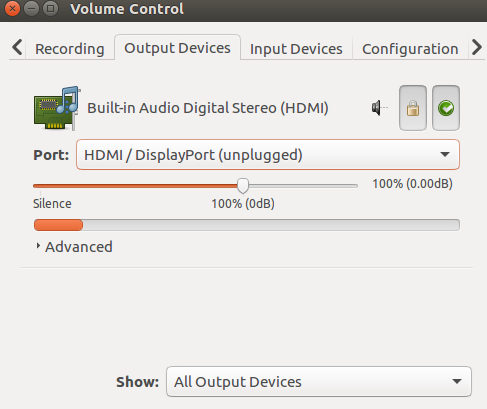


configuration


There is a dummy output and no sound.

Sunday, November 5, 2017

touchpad - Pointer Randomly Jumps Ahead in Ubuntu 18.04 (Razer Blade 2017)

So I recently upgraded from Ubuntu 16.04 to Ubuntu 18.04, and my mouse pointer has been acting weird. When I use an external mouse, the pointer works relatively smoothly, but when I use my synaptic touchpad built into my Razer Blade 2017, it is slightly laggy and jumps ahead, up to an inch, in the direction my pointer is moving to. When I restart my laptop, the jumpiness is minimised. However, when I suspend my computer and resume after a fresh restart, the jumpiness is increased. Furthermore, the more programs I run at once, the jumpier the pointer is. The pointer was never a problem in 16.04.


This is my xinput list output:


$ xinput list
⎡ Virtual core pointer id=2 [master pointer (3)]
⎜ ↳ Virtual core XTEST pointer id=4 [slave pointer (2)]
⎜ ↳ xwayland-pointer:15 id=6 [slave pointer (2)]
⎜ ↳ xwayland-relative-pointer:15 id=7 [slave pointer (2)]
⎣ Virtual core keyboard id=3 [master keyboard (2)]
↳ Virtual core XTEST keyboard id=5 [slave keyboard (3)]
↳ xwayland-keyboard:15


If I recall the xinput list from ubntu 16.04 correctly, an element with the words "synaptics" and "touchpad" should be displayed within the "Virtual core pointer" section. Also, the list doesn't change when my external mouse is connected.


When I try the synclient command, I get this:


$ synclient -l
Couldn't find synaptics properties. No synaptics driver loaded?


In 16.04 this command worked and displayed the setting values.


I tried this:


$ sudo apt install xserver-xorg-input-synaptics


However, it didn't fix anything.


I also tried this command suggested by a person with the exact same laptop and LTS version as me:


$ sudo apt install libinput-tools


There was no noticeable improvements.
I have also tried other methods, but they also didn't fix the problem.


It might be worth mentioning that when I was upgrading to 18.04, it failed/crashed mid installation. I used these steps to finish upgrading to 18.04.

installation - Ubuntu on a USB

I was just wondering if anyone had a good experience with Ubuntu on a flash drive... I'm installing it right now. I formatted my 16GB flash drive to Ext2 because the default file system is ext4 but that one is journaled and USB flash drives do not like journaling.


I want to use this to learn Java and Ubuntu seems to be a great OS for this. I (obviously) have USB 2.0 ports where I will put the USB in.


How is the boot time of Ubuntu on a USB?

Will laptop Dell Inspiron 15 7000 gaming 7567 work with Ubuntu?

I am planning to buy a laptop that meets my requirements and is compatible with Linux,this one meets my desired requirements, but will it run Linux Ubuntu or no?


Dell Inspiron 7567 is said to be certificated, but I'm not sure if this applies to gaming edition, here is the laptop:


https://www.amazon.com/Dell-Inspiron-Gaming-15-6-Inch-Screen/dp/B071JPYP1Z/ref=sr_1_4?s=pc&ie=UTF8&qid=1529590268&sr=1-4&keywords=Dell+inspiron+7567


Saturday, November 4, 2017

How to activate cube and related Compiz features without crashing Unity?


I have activated Desktop cube feature in Compiz by editing the config file way in this link:


  1. Preference >> Export

  2. Open the exported profile and edit it

  3. Find “s0_active_plugins” and replace wall with cube ; rotate;

  4. Save it.

  5. Preference >> Import as... and make the new profile.


But after that, if I tried to activate any feature in Compiz, the Unity crashes. What to do to activate (3D windows) and (cube reflection and decoration) and any other features without crashing unity?


How to Enable Compliz on Ubuntu 11.10 I have actually followed this and it works on my setup. If you do decide to follow this guide, you should create a ccsm shortcut on your desktop for use when you log back in. I also had to hit Ctrl + Alt + F1, and log in and restart lightdm by issuing the following:


sudo service lightdm restart

It came to a standard login box, once logged in I was unable to use Alt + F2 to try and run ccsm. Luckily, I did have a launcher for a different application. I just created a copy of the launcher and changed the path to "ccsm" and was able to launch ccsm that way.


dual boot - Why is the GRUB menu not shown on startup?

I recently installed Ubuntu 15.04 on Windows 10, but while starting the computer, it directly boots Ubuntu without any option to load Windows.


How can I get the boot menu and start Windows?

Can't install nvidia drivers on a 2 card laptop for xubuntu 14.04


I just installed xubuntu 14.04 on an asus gl771j laptop.
It comes with an integrated intel video card and another nvidia 860m video card.
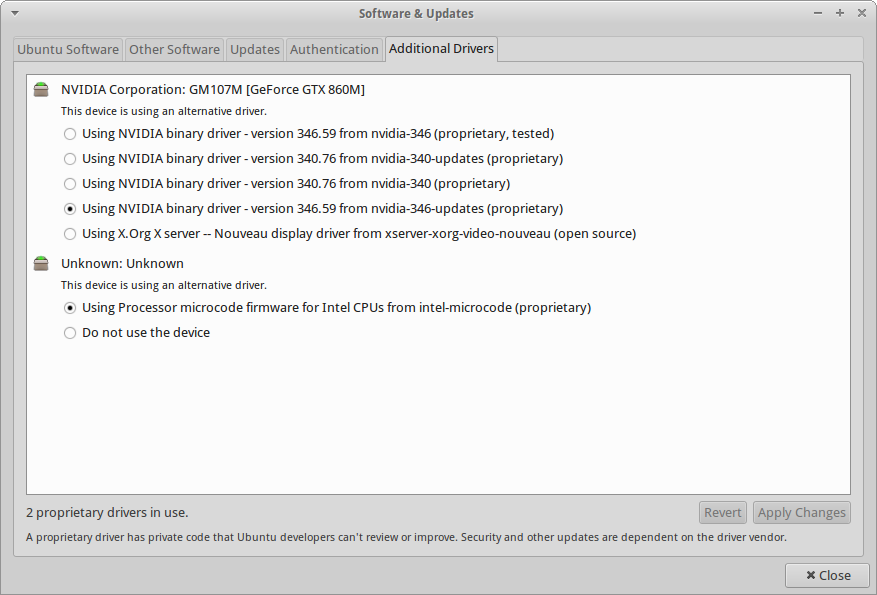
I open the additional drivers setting window and I get "no additional drivers available"
enter image description here


I got as far as getting this information, but that's it


sudo lshw -c video
*-display UNCLAIMED
description: 3D controller
product: GM107M [GeForce GTX 860M]
vendor: NVIDIA Corporation
physical id: 0
bus info: pci@0000:01:00.0
version: a2
width: 64 bits
clock: 33MHz
capabilities: pm msi pciexpress cap_list
configuration: latency=0
resources: memory:f6000000-f6ffffff memory:e0000000-efffffff memory:f0000000-f1ffffff ioport:e000(size=128) memory:f7000000-f707ffff
*-display
description: VGA compatible controller
product: 4th Gen Core Processor Integrated Graphics Controller
vendor: Intel Corporation
physical id: 2
bus info: pci@0000:00:02.0
version: 06
width: 64 bits
clock: 33MHz
capabilities: msi pm vga_controller bus_master cap_list rom
configuration: driver=i915 latency=0
resources: irq:53 memory:f7400000-f77fffff memory:d0000000-dfffffff ioport:f000(size=64)

How can I install the nvidia drivers?


Thanks in advance.


Ok,


First I thought maybe the problem was the Intel card driver. So I downloaded it from them, but then I saw that 14.04 was not a supported distro.


So I've installed 15.04 (even if I prefer LTS) and now I see this:
enter image description here
I haven't restarted yet :P


11.10 - Can't boot from USB after installing Ubuntu

I bought a Samsung series 5 notebook and a very strange thing happened: I installed Ubuntu 11.10 from a usb pen drive but when I restarted (...